Monday, November 30, 2015

NSF in $3.5M Project to Create Simulation and Big Data Resource


The National Science Foundation (NSF) and the University of Michigan (UM) will be investing about $3.5 million dollars on a new computing center called ConFlux. The high performance computing (HPC) system will help the school solve complex physics models, simulations and big data problems. Additionally, the project will look to address common scale limitations associated with these studies.
ConFlux is designed to have simulations and large datasets interface with each other during a run. The nodes will include CPUs, GPUs, large memory and fast interconnections. The storage of the big data will be on a three-petabyte (that’s 1015, or  a 1,000 terabyte) hard drive. These nodes are also designed to allow for data-intensive operations.
The HPC system will allow U.S. researchers to focus on computing infrastructure and data-driven physics, and to address studies previously done on supercomputers.
"Big data is typically associated with web analytics, social networks and online advertising. ConFlux will be a unique facility specifically designed for physical modeling using massive volumes of data," said Barzan Mozafari, UM assistant professor of computer science and engineering and overseer of the project.
As previously mentioned, a common problem with many simulations is scale. If you are looking into the material property behaviour at the atomic scale, or problems with complex systems like climate, scale is of primary importance.
Karthik Duraisamy, UM assistant professor of aerospace engineering at UM, notes that many of the world’s powerful computers are able to handle these problems by using approximations. Unfortunately, these approximations are not always accurate enough to answer some of the harder engineering and science questions.
"Such a disparity of scales exists in many problems of interest to scientists and engineers," said Duraisamy. "We need to leverage the availability of past and present data to refine and improve existing models."
To address this problem, experiments, measurements and simulations with limited scope can be used. Algorithms can crunch the data to make the needed predictions. The machine can learn more algorithms as the simulations, experiments and measurements improve and increase in number.
"It will enable a fundamentally new description of material behaviour — guided by theory, but respectful of the cold facts of the data. Wholly new materials that transcend metals, polymers or ceramics can then be designed with applications ranging from tissue replacement to space travel," said Krishna Garikipati, a professor in the departments of mechanical engineering and mathematics at UM.
Some research projects that will be using ConFlux include:
  • Combining non-invasive imaging with physical models for blood flow to treat cardiovascular disease.
  • More accurate turbulent simulations to predict swirls and eddies. This could improve airplane design, weather forecasting and climate science.
  • Studying the effects of climate change on clouds and precipitation.
  • Simulations of galaxy formations using galaxy-mapping studies to better understand the role of dark matter.
A Center for Data-Driven Computational Physics will be built to manage the ConFlux HPC system. The project will be funded by a $2.42 million NSF grant and $1.04 million from UM. The project fits in line with President Barack Obama’s National Strategic Computing Initiative to use vast data sets and to increase computing power.

Plasma Process Turns Garbage into Energy


In the movie “Back to the Future,” Doc Brown, having just returned from the year 2015, poured garbage into a “Mr Fusion” to generate fuel for his sports car/time machine. Here we are in 2015, still waiting for fusion technology to power the world. Here’s the next best thing: “Mr Plasma.”

Okay, so it’s not really called “Mr Plasma”* and it’s not exactly portable, but it does use plasma to turn garbage into fuel. Advanced Plasma Power (APP) has received funding to build the first plant designed to turn nearly any form of waste into renewable fuels for use in vehicles. The compressed biomethane produced by the plant is equivalent to compressed natural gas, but with a lower carbon footprint. In addition, it doesn’t require hydraulic fracturing (fracking) to obtain it - they just mine the landfills.

The Gasplasma® Process

The diagram below shows the main steps in the Gasplasma process. After recyclables have been removed, the remaining waste, known as refuse-derived fuel (RDF), is dried and fed into a gasifier. So far, the process is identical to a typical waste-to-energy gasifying operation, with a crude form of syngas being the product. But it’s about to get more interesting...

The low-level syngas and the remaining solids go into the plasma converter, which exposes the material to intense UV light and temperatures around 8000oC, producing a very clean syngas and a solid product known as Plasmarok®. The former can be used to create electricity, either as a fuel for a gas turbine or as input to a fuel cell. Syngas can also be converted to a substitute natural gas or a biofuel for vehicles. Plasmarok, the solid byproduct, is an inert, mechanically strong substance that can be used as an aggregate in roads or as a load bearing material in buildings. It’s been independently tested and shown not to leach pollutants into the surrounding environment.

The plasma converter’s intense heat allows it to process virtually any material, including most hazardous waste.

Nature Recycles Everything

In nature, there is no trash; everything is recycled. One organism’s waste is another’s sustenance. That’s why life on our home planet has thrived for several billion years. The Gasplasma process could mine landfills until they’re empty, at which point humanity can start sending its refuse directly to a Gasplasma processing facility, bypassing the landfill altogether. A sustainable future has no room for landfills.

Back to the Future

In the lab where I teach, the bulletin board shows this prediction from a 1949 edition of Popular Mechanics: “Computers in the future may weigh no more than 1.5 tons.” It only took about 20 years for that prophesy to become a reality, so I’ll make a bold prognosis here, and maybe it’ll appear in someone’s lab in 2035:
In the future, plasma-based waste-to-energy plants could weigh less than 1.5 tons.
Remember where you read it first!

APP has a demonstration/R&D plant that’s been operational for several years. The new facility will be the first ever commercial waste-to-energy facility that uses the patented Gasplasma process. Here’s a virtual tour of the plant, which will be constructed in 2016:


If you'd like to read all the gory details, check out  APP’s white paper describing the process.


Images and video courtesy of Advanced Plasma Power


*Note to the Advanced Plasma Power executives: if you decide to name your product “Mr Plasma,” you may send royalty checks to Tom Lombardo, c/o ENGINEERING.com.  

GoBox Teaches Coding and Robotics on a Monthly Basis


The team at Dexter Industries wants to produce robot kits that are easy to use, and inspire people from any background to learn about coding and technology. They started in 2013 with a Kickstarter campaign for BrickPi, a robotics platform that combined Lego Mindstorms and Raspberry Pi platforms to create robots.

Last year the team ran a campaign for GoPiGo, a robotics system built around Raspberry Pi and still intended to be used by any skill level. Dexter is currently crowdfunding GoBox, a robotics kit built around GoPiGo that delivers new missions every month. The missions each come with a different sensor to develop different robotics and programming skills while tying the lessons to real world applications.
Programming can be done in Python, Scratch, Node.js and Go but the platform is open source and advanced programmers can use their language of choice. The basic kit comes with an improved version of the base robot, now called the GoPiGo2, and assembly instructions.


A line follower sensor and circuitboard, a five megapixel camera, servo kit, light sensor, sound sensor, ultrasonic sensor, buzzer, motion sensor, infrared sensor, push button and LEDs are the different add on equipment that comes in the monthly boxes.
The sample lesson in the campaign video and available as a draft on the campaign page uses a light sensor to illustrate biomimicry. Students start with a basic idea of their project - figuring out an animal they can model that performs an action when transitioning from dark to light. A full design process of Problem - Design - Build - Code - Test - Iterate is shown to teach product design and basic problem solving.
GoBox is an awesome example of a team that was already creating a great product but questioned their mission and whether the product was fully meeting their goals. The engineers, programmers, designers and businesspeople are Dexter all worked to develop the GoBox to meet the goal of easier entry into coding and robotics. This is a great addition to the already busy field of inspirational and educational programming / building platforms.


Monday, June 15, 2015

Ubuntu Live CD

Systemback


Simple system backup and restore application with extra features
Systemback makes it easy to create backups of system and users configuration files. In case of problems you can easily restore the previous state of the system. There are extra features like system copying, system installation and Live system creation.
Installation:
sudo add-apt-repository ppa:nemh/systemback
sudo apt-get update
sudo apt-get install systemback

EASILY CREATE A CUSTOM UBUNTU LIVE CD WITH UBUNTU CUSTOMIZATION KIT (UCK)

When Ubuntu 10.04 Lucid Lynx comes out, I will probably upgrade instead of doing a fresh install. But I will also create an .ISO file for various usages and my Ubuntu Live CD will have GIMP installed by default (among other changes I will make to my custom ISO)! I'm not going to comment on the decision to exclude GIMP from the default Lucid installation, but I don't want to accept it so I will make a custom Ubuntu Lucid Lynx Live CD.

Ubuntu doesn't support customization before downloading the ISO, but you can customize your Ubuntu Live CD by using UCK - Ubuntu Customization Kit.

Ubuntu Customization Kit is a GUI tool that helps you customizing official Ubuntu Live CDs (including Kubuntu/Xubuntu and Edubuntu) to your needs. You can add any package to the live system, for example language packs, or applications.

Ubuntu Customization Kit

Using Ubuntu Customization Kit (UCK)


To use UCK, you will need (download link at the end of the post):

1. about 5 GB of free disk space in ~/tmp
2. Internet access for fetching language packs
3. apt-source line "deb-src http://archive.ubuntu.com/ubuntu/ karmic main" enabled (necessary for bootlogo building) - "karmic" should be changed if you use a different Ubuntu version.


If you want to build an ISO for an Ubuntu version other than the once you are currently using, you must open your /etc/apt/sources.list and search and replace (temporarily) any occurrence of your current Ubuntu version with the Ubuntu version you want to build the ISO for. Doing this is pretty easy: press ALT + F2, enter:
gksu gedit /etc/apt/sources.list

If for instance you are using Ubuntu Karmic and want to create an Lucid ISO (obviously, you will also need the Lucid ISO), replace "karmic" with "lucid" and save the file. Don't forget to revert the changes after you finish building your custom ISO (repeat the steps above, and replace "lucid" with "karmic" - in my example).

Note: If customizing a CD for another architecture than the installation used for customization the executables from the LiveCD may not run.

If you don't want to build a custom language ISO, you can simply click OK on the first 2 configuration screens, select your default Ubuntu .iso downloaded from the website, then just choose yes when asked if you want to customize the ISO. After this, the fun part begins: you can choose to open the UCK Package Manager which is basically Synaptic, but for UCK and then you can install new packages and remove others:

UCK package manager

You can also chose to select which packages to add / remove, via a terminal.

Once you are done with the customizations, select "Continue building":

uck

Now all you have to do is wait for UCK to finish your custom Ubuntu ISO. On a slow computer, it cant take quite a while. Once the ISO file is ready, it will be saved under ~/tmp/remaster-new-files/livecd.iso.

For a more advanced way of customizing your Ubuntu Live CD (manually, without a GUI), see this HOW-TO.

Download Ubuntu Customization Kit


We already posted about UCK (Ubuntu Customization Kit) which is an application for creating acustom Ubuntu Live CD, but it doesn't have as many options as one would expect and it only runs in Ubuntu, as an application. One of the most mentioned ideas at Ubuntu Brainstorm is creating a custom installation/live cd website-as-service which would allow users to customize their install/live cd, in the spirit of Linux and open-source in general.


A service like this already exists: Reconstructor, a web based GNU/Linux distribution customization and creation toolkit. It allows for the customization of the Ubuntu and Debian GNU/Linux distributions. Customizations include boot logo image and text color, wallpaper, themes, icons, applications, and more.

Reconstructor is free to use. Even though it says certain services cost actual money, every user starts with a $5 balance and gets $5 each month which is enough for building and downloading your custom Ubuntu / Debian distributions. More info on this.


More about Reconstuctor and how to use it


Once create your free account and log-in, you can choose if you want your Ubuntu / Debian with Gnome, KDE, XFCE or text only:

reconstructor select distro

And then you get to edit the actual packages that come with your custom Ubuntu / Debian Linux distribution:

reconstructor packages


Under the "Modules" section, you can edit the default theme, upload custom .deb files, change the default icons and wallpaper, boot menu and even create custom GConf keys (among many other options):

reconstructor modules


Here is the full list of things you can add through Modules:

  • Apt repository
  • Custom boot menu
  • Default theme (for Gnome, etc., use an already installed theme or upload your own)
  • Add Ubuntu PPA repositories
  • Perform a system upgrade
  • Change the Usplash image
  • Change Firefox start page
  • Create a custom desktop launcher
  • Change the default icon theme (use an already installed theme or upload your own)
  • Change the wallpaper
  • Window border
  • Install .deb package
  • Install a file to the chroot environment
  • Set the Live Environment hostname
  • Set the initial splash image of the Live CD
  • Set the live CD text color
  • Modify Gconf keys

Other than this, there are also some more advanced options.


reconstructor build process

When your project is ready, click on the "Build project" icon on the top left corner. Then you can select how you want your project to be built: as a Live Image, VMWare, Xen or Qemu:

reconstructor live image

When your project has finished building, you will receive an email with a download link and a log. In my test, it took around 5-10 minutes for my custom Ubuntu to be built. The downloads are valid for 7 days. After that you will need to rebuild the project.

Friday, December 19, 2014

Oracle Client Installation in UBUNTU

Install SQL*Plus

  1. Download .rpm package here
  2.  
    • oracle-instantclient*-basic-*.rpm
    • oracle-instantclient*-devel-*.rpm
    • oracle-instantclient*-sqlplus-*.rpm
  3. Install alien (sudo apt-get install alien)
  4. Convert the rpm files and install
    • sudo alien -i oracle-instantclient*-basic-*.rpm
    • sudo alien -i oracle-instantclient*-devel-*.rpm
    • sudo alien -i oracle-instantclient*-sqlplus-*.rpm
  5. Install libaio1
  6. Add oracle.conf (echo /usr/lib/oracle/12.1/client/lib > /etc/ld.so.conf.d/oracle.conf) and Reload .conf (sudo ldconfig)
  7. Type Sqlplus in Terminal

Connecting To Oracle Server


Rational Application Developer on UBUNTU

Installing Rational Application Developer on UBUNTU

  1. Boot Ubuntu and log in.
  2. Open a command prompt and type the following to change your default shell from dash to bash:
    $ sudo dpkg-reconfigure dash
  3. Download and install the following debian package: http://packages.ubuntu.com/jaunty/libs/libstdc++5 - as RAD requires this and Ubuntu 10.04 ships only with a newer version.
  4. Insert RAD Setup Disk and run the following commands (launchpad.sh complains if you're not root):
    $ cd /media/rad_bundle_disk1
    $ sudo ./launchpad.sh
  5. Select "Install IBM Rational Application Developer for WebSphere Software".  Follow the prompts to install IBM Installation Manager and wait for it to restart.
  6. Select "Install IBM Rational Application Developer for WebSphere Software" (again!).
  7. Close the launchpad/Firefox window.  Either close your Terminal window (from Step 4) or cd out of /media/rad_bundle_disk1.  This allows the currently mounted CD to be unmounted by Ubuntu later when you need to change discs.
  8. Go back to IBM Installation Manager and select Install.  Update IBM Installation Manager if prompted.
  9. Select RAD7.5 and WebSphere 7.0 test environment, agree to the license, Click through and accept the default installation components.  (Personally, I disable administrative security on the profile).
  10. The installer will trundle away for an hour or so.  Click Finish when done.
  11. You're getting there...  Create the following script (/opt/IBM/SDP/launchEclipse.sh) for launching RAD as a lot of people have had troubles with this GDK_NATIVE_WINDOWS setting:
    #!/bin/sh
    export GDK_NATIVE_WINDOWS=true
    /opt/IBM/SDP/eclipse
    Set this script to executable:
    $ sudo chmod 755 /opt/IBM/SDP/launchEclipse.sh
  12. RAD/eclipse has been installed as root, and (for me anyway) it didn't put the IBM InstallationManager or RAD in the Ubuntu Applications menu.  So I created my own Application Launchers:

    Name: RAD7.5
    Command: /opt/IBM/SDP/launchEclipse.sh
    Icon: /opt/IBM/SDP/rad/RAD_v7_16.xpm

    Name: IBM Installation Manager
    Command: gksudo /opt/IBM/InstallationManager/eclipse/launcher
    Icon: /opt/IBM/InstallationManager/eclipse/documentation/IIM_32.xpm
  13. Before launching I also needed to add the following line to /opt/IBM/SDP/eclipse.ini, to fix an issue where eclipse will crash on the Welcome screen for a new workspace:
    -Dorg.eclipse.swt.browser.XULRunnerPath=/usr/lib/xulrunner
  14. If you want to run RAD *not* as root, you'll need to add write permissions to the following directory so RAD can interact with your WAS test environment profile (which is only writable by root as this is the user we used to install RAD):
    $ sudo chmod -R 777 /opt/IBM/SDP/runtimes/base_v7/profiles
That's it!  You should now be able to run RAD from your Application Launcher.
http://packages.debian.org/squeeze/libstdc++5 


Wednesday, April 16, 2014

Future Challenges in Computer Science

Computer Science: Facing Challenges and Improving the World

Computer science is faced with many challenges as the digital universe expands. From mobile and cloud computing to data security, addressing these issues can require large, structural changes, but an examination of these problems can lead to organizational solutions and improvements in the world.

Challenges in Computer Science 

More employees and customers are using mobile technology.
A switch to cloud services and an emphasis on mobile platforms are essential.
The Internet’s infrastructure will need to be updated to match the “New Internet.”
In 2020, 100-billion uniquely identifiable objects will be connected to the Internet.
80% of security professionals rated data leaks and exposure of sensitive information as the highest concern.

Changing the architecture of organizational networks can seem daunting. Below are suggested steps.

Steps Toward Solution

• Identify and remove bottlenecks, improve routing patterns, and utilize better servers.
• Use software-defined networking to allocate resources and increase data efficiency.
• Change 10GB fiber optic cables to 100GB. As organizations improve networking and infrastructure, an explosion of data will lead to more problems with rewarding solutions.

Big Data and the Digital Universe

By 2020, the digital universe will grow from 130 to 40,000 Exabytes.
• The data that requires protection will grow by 40%.
• Data will become more complicated and harder to secure, store, and analyze.
While the problems facing computer science and Big Data are paramount, these issues can lead to opportunities within bioinformatics and health care to improve the world.

Changing the World

• Improved experiments and advances in data visualization and health technology are leading to insight into cancer and rare diseases.
• Genomics is helping researchers understand genetic diseases and could result in profound improvements in treatment. 


The Intersection of Healthcare and IT

This infographic takes a look at the field of health informatics, explaining the relation between healthcare and technology.


The Growth of Distance Learning

Distance learning used to be a cumbersome and uncertain alternative to the traditional classroom experience. However, Internet technology has made digital learning more interactive, and drastically improved the quality of these programs. There has been a significant jump in distance learning enrollment among undergraduate students recently. How popular have these programs become, and what might these trends hold for the future?


Li-Fi affords Internet through light bulb

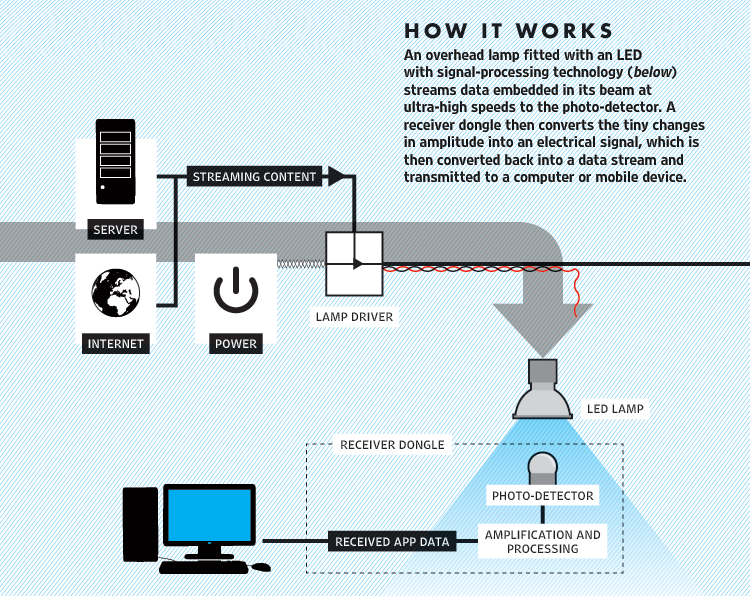
Li-Fi enables data transmission through illumination by taking the fiber out of fiber optics by sending data through a LED light bulb. Li-Fi is visible electromagnetic spectrum and has higher bandwidth than Wi-fi but has Line of sight limitation. Li-Fi promises to be cheaper and more energy-efficient than the existing wireless radio systems given the ubiquity of LED bulbs and the fact that lighting infrastructure is already in place.


Li-Fi was coined by Professor Harald Haas from the University of Edinburgh in the UK and pure VLC’s CSO, and refers to a type of VLC technology that delivers a networked, mobile, high-speed communication solution in a similar manner as Wi-Fi. Developed exclusively in France by Oledcomm the startup of the System Engineering Laboratory of the University of Versailles, it was presented for the first time in the “connected home” of France Television at the LeWeb 12 forum, as the revolution of tomorrow! Visible light is part of the electromagnetic spectrum and 10,000 times bigger than the radio spectrum, affording potentially unlimited capacity.

Advantages of Li-Fi:
A frequencies band completely free and unlicensed worldwide
Every Li-Fi light unit can convey up to 10 times more information than a Wi-Fi Hot-Spot
Adapted to buildings or infrastructures where GSM and Wi-Fi are forbidden or cannot pass
No interference with radio waves and electromagnetic fields

Geolocation information :
You can target information to relay accurately depending on the lighting device

Exchange your files safely :
As light does not cross walls, you have an increased security of your wireless
Combined to LED lighting you can save energy up to 80% compared to a traditional lighting
Omnipresence of LEDs in domestic lighting, industrial, displays and urban signage
Ability of multi-user communication

And the drawbacks are that if you block the light and the signal will be blocked.

Somehow, Li-Fi also a potential advantage from a security point of view. Light cannot penetrate walls as radio signals can, so drive-by hacking of wireless internet signals would be far more difficult, if not impossible. Even though the technology is still infancy, it needs further developments in microchip design and optical communication controls before it could go mass market. 

Tuesday, March 18, 2014

Fix “File is too large for destination file system” Error

Fix “File is too large for destination file system” Error

 Well, the reason for this problem is because my file was 4.3 GB in size and my external hard drive was formatted in FAT32 format. The max file size for FAT32 is 4GB. The max file size for FAT16 is only 2GB!

Let’s try converting the drive to a NTFS and No Security setting. This can be done by:
·         Click the Start Orb
·         Click All Programs
·         Click Accessories
·         Click System Tools
·         Right click Command Prompt
·         Click Run as Administrator
·         Enter the command, convert <drive> /fs:ntfs /nosecurity (<drive should be the drive letter of your external hard drive, for example convert F: /fs:ntfs /nosecurity )


Tuesday, February 18, 2014

USB Drive Folders Not Showing or visible

Solved:

Follow the steps below ,

1. Go to Start
2. Press windows key + R
3. In Run pop window type CMD
4. In Command prompt type this line below

     attrib -h -r -s  /s /d g:\*.*

      here g: specifies u'r pen drive, please change according to your pen drive path  in computer.

Wednesday, January 29, 2014

Tamil Nadu Government Laptop Dual Boot Problem [Solved]

New free laptops for students are provided in Tamil Nadu by the Government. As they are giving dual OS(Windows 7 Professional and Linux) for educational purpose , there is some problem occurs with that dual boot. In order to rectify that problem this post will give you the correct solution for that.

Problem identified:
while booting the laptop following occurs
"Grub rescue>"

In that laptop they didnt provide any CD or DVD R/W to load CD or DVD. So, we have to fix it via a Pendrive containing a Windows 7 OS.

Follow the steps one by one:

1. Plug in your Bootable pendrive to your laptop (Link:How to make a Bootable Pendrive?)

2.Power on the laptop and press F12 to boot . And select your pendrive.

3.Windows will load when the "Install Now" screen appears. select the "Repair your system" below that "Install Now".

4.Then it will show your operation system click on "Load Driver" which is located at the bottom.

5.There will be list of windows recovery options will be listed. From that select the command prompt.

6.Type the following code in that Command prompt: (Without qoutes)
          "bootrec /fixmbr"

7.Thats all finished. Now you  got your old msdos loader for both of your Dual booted OS's.

8.Then press Restart at the bottom of that current dialogue box to take effect.

9.After restart your laptop will show your both OS's to which from boot(Load).

To Make a Bootable pendrive Download the Following:

Universal usb installer  Download this software. And select the Linux distribution as Windows vista installer. And select your Windows 7  iso file and select your pendrive then click on create >yes to make a bootable pendrive. Enjoy!!!


Dont forget to check "Format before install" on that software!!

Wednesday, December 25, 2013

Install Telnet Client in Operating System


On Windows 7, Windows Server 2008 R2, Windows Server 2008 or Windows Vista you can use the following command line procedure to install Telnet Client.
  1. Open a command prompt window. Click Start, type cmd in the Start Search box, and then press ENTER.
  2. Type the following command:
    pkgmgr /iu:"TelnetClient"
    
  3. If the User Account Control dialog box appears, confirm that the action it displays is what you want, and then click Continue.
  4. When the command prompt appears again, the installation is complete.

    On Windows Server 2008, you can use the Role Management tool to install optional components.
    1. Start Server Manager. Click Start, right-click Computer, and then click Manage.
    2. If the User Account Control dialog box appears, confirm that the action it displays is what you want, and then click Continue.
    3. In the Features Summary section, click Add features.
    4. In the Add Features Wizard, select Telnet Client, and then click Next.
    5. On the Confirm Installation Options page, click Install.
    6. When installation finishes, on the Installation Results page, click Close.


    Telnet is a simple but extremely popular protocol for exchanging data between two computers. It is often used for testing computer programs and the Telnet utility is included with Vista, Windows 7 and Windows 8 computers as well though it is not enabled by default.
    Windows Telnet Client

    How to Install Telnet in Windows

    If you would like to use the Telnet command from the DOS (command) prompt, follow these steps to re-enable the Telnet client on your Windows machine:
  5. Go to Control Panel – > Programs and Features.
  6. Click Turn Windows Features on or off.
  7. Enable Telnet Client and click OK.
That’s it. Open the command prompt, type telnet to make sure it works.

Wednesday, December 4, 2013

Windows 8: Enable .NET Framework 3.5 (includes .NET 2.0 and 3.0)


 i.e. (NetFx3) feature in Online & Offline mode!

Obviously the first step for us is to check the Program and Features to enable any available additional features in an Operating System. This is what you see in your Control Panel –> Program and Features. Click on Turn Windows features on or off. 

Here you can see .NET Framework as a feature and by default the feature is disabled. You can enable this particular right away using this GUI Tool but in order to do that you need to be connected to internet i.e. Online Mode. Other way is using DISM Command and this can be done in an Offline Mode using Windows 8 installation media. Let’s see these 2 methods.
Method 1: When you are Online, connected to Internet.
In order to install the following window click on the .NET Framework 3.5 (included .NET 2.0 and 3.0) select it & click OK
image
Now, it will download the entire package from the internet & install the .NET Framework feature.
Method 2: When you are Offline and not connected to Internet
If you open CMD.EXE with Administrative Privileges i.e. at elevated level & run the this DISM command dism /online /get-features you will see that from the State that .NET Framework is not part of the Operating System.
image
image
So the first thing you need to do is to copy the required package to local machine before you run the command to install .NET Framework. To do that use Windows 8 ISO/DVD/USB Media. You need to copy SXS folder to local machine located at D:\sources\sxs (In this case D: your drive letter on which you have loaded Windows 8 Media)
image
You can also use the following command to copy this folder locally. xcopy d:\sxs\*.* c:\sxs /s
Once completed, in order to install this feature you can run the following command dism /online /enable-feature /featurename:NetFx3 /All /SourceC:\sxs /LimitAccess  and hit Enter
image
After completing the installation of .NET Framework 3.5 you can see that the feature is enabled in the Control Panel –> Program and Features
image
Bingo. Now you can enable .NET Framework feature on Windows 8 without needing of an internet connection.
Enjoy

Friday, November 8, 2013

WINDOWS RUN Commands !!!


1. Accessibility Controls - access.cpl
2. Accessibility Wizard - accwiz
3. Add Hardware Wizard - hdwwiz.cpl
4. Add/Remove Programs - appwiz.cpl
5. Administrative Tools - control admintools
6. Automatic Updates - wuaucpl.cpl
7. Bluetooth Transfer Wizard - fsquirt
8. Calculator - calc
9. Certificate Manager - certmgr.msc
10. Character Map - charmap
11. Check Disk Utility - chkdsk
12. Clipboard Viewer - clipbrd
13. Command Prompt - cmd
14. Component Services - dcomcnfg
15. Computer Management - compmgmt.msc
16. Control Panel - control
17. Date and Time Properties - timedate.cpl
18. DDE Shares - ddeshare
19. Device Manager - devmgmt.msc
20. Direct X Troubleshooter - dxdiag
21. Disk Cleanup Utility - cleanmgr
22. Disk Defragment - dfrg.msc
23. Disk Management - diskmgmt.msc
24. Disk Partition Manager - diskpart
25. Display Properties - control desktop
26. Display Properties - desk.cpl
27. Dr. Watson System Troubleshooting Utility -
drwtsn32
28. Driver Verifier Utility - verifier
29. Event Viewer - eventvwr.msc
30. Files and Settings Transfer Tool - migwiz
31. File Signature Verification Tool - sigverif
32. Findfast - findfast.cpl
33. Firefox - firefox
34. Folders Properties - control folders
35. Fonts - control fonts
36. Fonts Folder - fonts
37. Free Cell Card Game - freecell
38. Game Controllers - joy.cpl
39. Group Policy Editor (for xp professional) -
gpedit.msc
40. Hearts Card Game - mshearts
41. Help and Support - helpctr
42. HyperTerminal - hypertrm
43. Iexpress Wizard - iexpress
44. Indexing Service - ciadv.msc
45. Internet Connection Wizard - icwconn1
46. Internet Explorer - iexplore
47. Internet Properties - inetcpl.cpl
48. Keyboard Properties - control keyboard
49. Local Security Settings - secpol.msc
50. Local Users and Groups - lusrmgr.msc
51. Logs You Out Of Windows - logoff
52. Malicious Software Removal Tool - mrt
53. Microsoft Chat - winchat
54. Microsoft Movie Maker - moviemk
55. Microsoft Paint - mspaint
56. Microsoft Syncronization Tool - mobsync
57. Minesweeper Game - winmine
58. Mouse Properties - control mouse
59. Mouse Properties - main.cpl
60. Netmeeting - conf
61. Network Connections - control netconnections
62. Network Connections - ncpa.cpl
63. Network Setup Wizard - netsetup.cpl
64. Notepad - notepad
65. Object Packager - packager
66. ODBC Data Source Administrator -
odbccp32.cpl
67. On Screen Keyboard - osk
68. Outlook Express - msimn
69. Paint - pbrush
70. Password Properties - password.cpl
71. Performance Monitor - perfmon.msc
72. Performance Monitor - perfmon
73. Phone and Modem Options - telephon.cpl
74. Phone Dialer - dialer
75. Pinball Game - pinball
76. Power Configuration - powercfg.cpl
77. Printers and Faxes - control printers
78. Printers Folder - printers
79. Regional Settings - intl.cpl
80. Registry Editor - regedit
81. Registry Editor - regedit32
82. Remote Access Phonebook - rasphone
83. Remote Desktop - mstsc
84. Removable Storage - ntmsmgr.msc
85. Removable Storage Operator Requests -
ntmsoprq.msc
86. Resultant Set of Policy (for xp professional) -
rsop.msc
87. Scanners and Cameras - sticpl.cpl
88. Scheduled Tasks - control schedtasks
89. Security Center - wscui.cpl
90. Services - services.msc
91. Shared Folders - fsmgmt.msc
92. Shuts Down Windows - shutdown
93. Sounds and Audio - mmsys.cpl
94. Spider Solitare Card Game - spider
95. SQL Client Configuration - cliconfg
96. System Configuration Editor - sysedit
97. System Configuration Utility - msconfig
98. System Information - msinfo32
99. System Properties - sysdm.cpl
100. Task Manager - taskmgr
101. TCP Tester - tcptest
102. Telnet Client - telnet
103. User Account Management - nusrmgr.cpl
104. Utility Manager - utilman
105. Windows Address Book - wab
106. Windows Address Book Import Utility - wabmig
107. Windows Explorer - explorer
108. Windows Firewall - firewall.cpl
109. Windows Magnifier - magnify
110. Windows Management Infrastructure -
wmimgmt.msc
111. Windows Media Player - wmplayer
112. Windows Messenger - msmsgs
113. Windows System Security Tool - syskey
114. Windows Update Launches - wupdmgr
115. Windows Version - winver

Tuesday, September 17, 2013

Top 10 Strategic Technology Trends for 2013: Big Data, Cloud, Analytics and Mobile

The top 10 technologies and trends that will be strategic for most organizations in 2013, presented during Gartner Symposium/ITxpo.

Gartner defines a strategic technology as one with the potential for significant impact on the enterprise in the next three years. Factors that denote significant impact include a high potential for disruption to IT or the business, the need for a major dollar investment, or the risk of being late to adopt.

A strategic technology may be an existing technology that has matured and/or become suitable for a wider range of uses. It may also be an emerging technology that offers an opportunity for strategic business advantage for early adopters or with potential for significant market disruption in the next five years. These technologies impact the organization's long-term plans, programs and initiatives.

“We have identified the top 10 technologies that will be strategic for most organizations, and that IT leaders should factor into their strategic planning processes over the next two years,” said David Cearley, vice president and Gartner fellow. “This does not necessarily mean enterprises should adopt and invest in all of the listed technologies; however companies need to be making deliberate decisions about how they fit with their expected needs in the near future.”

Cearley said that these technologies are emerging amidst a nexus of converging forces - social, mobile, cloud and information. Although these forces are innovative and disruptive on their own, together they are revolutionizing business and society, disrupting old business models and creating new leaders. As such, the Nexus of Forces is the basis of the technology platform of the future.
The top 10 strategic technology trends for 2013 include:

Mobile Device Battles

Gartner predicts that by 2013 mobile phones will overtake PCs as the most common Web access device worldwide and that by 2015 over 80 percent of the handsets sold in mature markets will be smartphones. However, only 20 percent of those handsets are likely to be Windows phones. By 2015 media tablet shipments will reach around 50 percent of laptop shipments and Windows 8 will likely be in third place behind Google’s Android and Apple iOS operating systems. Windows 8 is Microsoft’s big bet and Windows 8 platform styles should be evaluated to get a better idea of how they might perform in real-world environments as well as how users will respond. 

Consumerization will mean enterprises won't be able to force users to give up their iPads or prevent the use of Windows 8 to the extent consumers adopt consumer targeted Windows 8 devices. Enterprises will need to support a greater variety of form factors reducing the ability to standardize PC and tablet hardware. The implications for IT is that the era of PC dominance with Windows as the single platform will be replaced with a post-PC era where Windows is just one of a variety of environments IT will need to support.

Mobile Applications and HTML5

The market for tools to create consumer and enterprise facing apps is complex with well over 100 potential tools vendors. Currently, Gartner separates mobile development tools into several categories. For the next few years, no single tool will be optimal for all types of mobile application so expect to employ several. Six mobile architectures – native, special, hybrid, HTML 5, Message and No Client will remain popular. However, there will be a long term shift away from native apps to Web apps as HTML5 becomes more capable. 

Nevertheless, native apps won't disappear, and will always offer the best user experiences and most sophisticated features. Developers will also need to develop new design skills to deliver touch-optimized mobile applications that operate across a range of devices in a coordinated fashion.

Personal Cloud

The personal cloud will gradually replace the PC as the location where individuals keep their personal content, access their services and personal preferences and center their digital lives. It will be the glue that connects the web of devices they choose to use during different aspects of their daily lives. 

The personal cloud will entail the unique collection of services, Web destinations and connectivity that will become the home of their computing and communication activities. Users will see it as a portable, always-available place where they go for all their digital needs. 

In this world no one platform, form factor, technology or vendor will dominate and managed diversity and mobile device management will be an imperative. The personal cloud shifts the focus from the client device to cloud-based services delivered across devices.

Enterprise App Stores

Enterprises face a complex app store future as some vendors will limit their stores to specific devices and types of apps forcing the enterprise to deal with multiple stores, multiple payment processes and multiple sets of licensing terms. 

By 2014, Gartner believes that many organizations will deliver mobile applications to workers through private application stores. With enterprise app stores the role of IT shifts from that of a centralized planner to a market manager providing governance and brokerage services to users and potentially an ecosystem to support apptrepreneurs.

The Internet of Things

The Internet of Things (IoT) is a concept that describes how the Internet will expand as physical items such as consumer devices and physical assets are connected to the Internet. Key elements of the IoT which are being embedded in a variety of mobile devices include embedded sensors, image recognition technologies and NFC payment. 

As a result, mobile no longer refers only to use of cellular handsets or tablets. Cellular technology is being embedded in many new types of devices including pharmaceutical containers and automobiles. Smartphones and other intelligent devices don't just use the cellular network, they communicate via NFC, Bluetooth, LE and Wi-Fi to a wide range of devices and peripherals, such as wristwatch displays, healthcare sensors, smart posters, and home entertainment systems. The IoT will enable a wide range of new applications and services while raising many new challenges.

Hybrid IT and Cloud Computing

As staffs have been asked to do more with less, IT departments must play multiple roles in coordinating IT-related activities, and cloud computing is now pushing that change to another level.
A recently conducted Gartner IT services survey revealed that the internal cloud services brokerage (CSB) role is emerging as IT organizations realize that they have a responsibility to help improve the provisioning and consumption of inherently distributed, heterogeneous and often complex cloud services for their internal users and external business partners. The internal CSB role represents a means for the IT organization to retain and build influence inside its organization and to become a value center in the face of challenging new requirements relative to increasing adoption of cloud as an approach to IT consumption.

Big Data is moving from a focus on individual projects to an influence on enterprises’ strategic information architecture. Dealing with data volume, variety, velocity and complexity is forcing changes to many traditional approaches. This realization is leading organizations to abandon the concept of a single enterprise data warehouse containing all information needed for decisions. Instead they are moving towards multiple systems, including content management, data warehouses, data marts and specialized file systems tied together with data services and metadata, which will become the "logical" enterprise data warehouse.

Actionable Analytics

Analytics is increasingly delivered to users at the point of action and in context. With the improvement of performance and costs, IT leaders can afford to perform analytics and simulation for every action taken in the business. The mobile client linked to cloud-based analytic engines and big data repositories potentially enables use of optimization and simulation everywhere and every time. This new step provides simulation, prediction, optimization and other analytics, to empower even more decision flexibility at the time and place of every business process action.

In Memory Computing

In memory computing (IMC) can also provide transformational opportunities. The execution of certain-types of hours-long batch processes can be squeezed into minutes or even seconds allowing these processes to be provided in the form of real-time or near real-time services that can be delivered to internal or external users in the form of cloud services. Millions of events can be scanned in a matter of a few tens of millisecond to detect correlations and patterns pointing at emerging opportunities and threats "as things happen." The possibility of concurrently running transactional and analytical applications against the same dataset opens unexplored possibilities for business innovation. Numerous vendors will deliver in-memory-based solutions over the next two years driving this approach into mainstream use.

Integrated Ecosystems

The market is undergoing a shift to more integrated systems and ecosystems and away from loosely coupled heterogeneous approaches. Driving this trend is the user desire for lower cost, simplicity, and more assured security. Driving the trend for vendors the ability to have more control of the solution stack and obtain greater margin in the sale as well as offer a complete solution stack in a controlled environment, but without the need to provide any actual hardware. 

The trend is manifested in three levels. Appliances combine hardware and software and software and services are packaged to address and infrastructure or application workload. Cloud-based marketplaces and brokerages facilitate purchase, consumption and/or use of capabilities from multiple vendors and may provide a foundation for ISV development and application runtime. In the mobile world, vendors including Apple, Google and Microsoft drive varying degrees of control across and end-to-end ecosystem extending the client through the apps.

Sunday, July 28, 2013

Top Trends in Cloud Computing 2013

In 2012, cloud computing became a much bigger trend in the business and networking world. IDC have predicted a 130% increase in cloud computing by 2016, meaning an increase to $43 billion. Here are some of the five trends to look out for that are coming in 2013 which are going to help boost cloud computing in the long term,

Subscription

With more and more companies beginning to look into cloud computing, the hype is growing every day and more businesses are using it. Colleges are using it more and more to help store lecture data for easy access to the class. Businesses are using it to work from home, pick up easy access to documents and for sharing important company information. One of the big changes expected to appear in 2013 is the subscription model for Cloud computing. The idea is that you will only pay for how much data you need, rather than buying bulk for space that may never be used. It gives you a powerful security measure as well, knowing that your paid-up data is protected and accessible at any given time.

Recovery Services

Cloud computing gives you so much freedom, it could eventually start to replace backup companies as a cost-effective and easy to use way to back-up your whole company. Using resources that are only stored on the company intranet, it would be very good to be able to have important company documents stored online, saved and updated regularly. There has been more and more talk and actual action of smaller to medium businesses moving toward the cheaper cloud alternative, and the trends are showing that larger businesses are beginning to see the potential in cloud computing, too.

Security

The one hold-back of cloud computing at this moment in time, is the lack of – or perceived lack of – quality in the defense it offers you and your data. Cloud computing however is improving all the time, and there is a continued effort to bring in new clients with more and more companies that provide cloud computing to produce a top quality safety structure. This is essential as cloud computing is all about protection and privacy anyway, so getting this right could really detonate the niche. This is surprising because you would imagine that a software as important as cloud computing would already have top-grade security.

Specific Designs

Much like when phone apps became big, more companies started to spend money on having a mobile app designed to complement the website. Restaurants perhaps seen the most use from this, as it gave them a new dimension and something to hook in potential customers with. Businesses are beginning to view cloud computing in the same light. It can be shifted and edited to make your organization more powerful and to give you a top of the range service which is very unique at present. As the trends show, more and more businesses are looking to leverage the power of the internet and using a modified version of cloud computing could be an extremely valuable tool for certain niches.

Hoarding

This may sound odd, but the term hoarders refers to people who just pile up crazy amounts of junk in their house and hold onto it for years, believing all of it to be extremely valuable. Well, cloud computing has been shown to be heading toward a budding trend of hoarders getting involved. More people are filling up their cloud compartments with random old files, and sentimental objects, that remind them of a previous time in their life. They do not want to delete these files permanently, but they don’t really intend on looking at them or using them ever again.

Cloud Computing and Mobile Technology in Indian Universities

Six universities in the northeast will adopt cloud and mobile phone technology in their curriculum in graduate, post graduate and diploma levels, becoming the only educational institutions in the country to offer such courses. The technology, part of Microsoft's Azure for Cloud computing, will be included in the July and August curriculum of the universities, and is intended to give an edge to students from the region looking to make a career in this burgeoning field.

The universities that have updated their curriculum with respect to the latest technology available in cloud computing and mobile technology are Rajiv Gandhi University, Manipur University, Tripura University, Mizoram University, Tezpur University and North East Hill University (NEHU).

Cloud technology is a standardized IT capability in the lines of software application platform and infrastructure delivered through the internet via pay-per-use or self-service mode. Cloud technology is also a marketing term referring to storage, computation and connection to multiple servers. There are three scenarios in which cloud technology is applicable and it focuses on public cloud, private cloud and cloud productivity.

"Cloud technology was developed only in 2010 and it is the current technological marvel through which users can make access their applications in a very conducive atmosphere. Microsoft is very serious about the educational scenario in the country. The reason that we have chosen the Northeast is because, compared to other parts of the country, the wave and the effects of economic liberalisation have been slow here. At the same time, the scenario is changing and to remove these deficiencies we have decided that this region should be given a fair chance of technological education. It is part of an initiative called Microsoft Faculty Connection, where we provide free training to faculties in terms of curriculum with commitments to educational institutions," said Venkatesh Sarvasiddhi, DPE, academic developer evangelist, Microsoft. "We are helping the institutions build resources, train and enhance the employability skills of students," he added. Imocha Singh, head of the computer science department at Manipur University, said: "This will help the students, especially those in the IT field, as they will equipped to handle this new technology. The course will give them an edge over others and students from the northeast. IT is a great opportunity for employees and one can address technological requirements through such updating of the curriculum. The students are definitely excited and full of enthusiasm."

Part of the curriculum will also include technology with respect to mobile phones and smart phones specifically focusing on Windows Phone, which has been designed to deliver a mobile experience in getting people together. "We will be using this as a platform in imparting the required education and for this purpose we will have a Faculty Connect Symposium in Manipur to train faculties. added Sarvasiddhi.


Sunday, June 2, 2013

Top Trends in Computer science 2013

Top trends in Computer Society

As a technology professional, keeping on top of trends is crucial. Below is a list of technology topics that Computer Society magazines, journals, and conferences will be focusing on next year:

1) Internet of Things

The Internet of Things is more than just the newest buzzword. The IoT promises to be the most disruptive technological revolution since the advent of the World Wide Web. Projections indicate that up to 100 billion uniquely identifiable objects will be connected to the Internet by 2020, but human understanding of the underlying technologies has not kept pace. This creates a fundamental challenge to researchers, with enormous technical, socioeconomic, political, and even spiritual consequences.
In recognition of the importance of IoT, Computer, the IEEE Computer Society's flagship magazine, is planning a special issue in February 2013. "The Internet of Things: The Next Technological Revolution" will offer a forum for highlighting what the IoT could bring to the end user. Recommended topics for this special issue include design and development methodology for a user-centered IoT; the dynamics of social media and connected objects; community programming for the IoT, including citizen science, citizen journalism, and social activism; opportunistic sensing, big data, and the IoT; and the impact of the IoT on the future networked society.

2) Cyber security

Recent technological advances in computing, communications, software, and hardware have enabled the significant growth of cyberspace, an important aspect of modern life that continues to transform the way citizens, business, and governments interact, collaborate, and conduct business. Our heavy dependence on various digital infrastructures has made them strategic national assets that must be protected to ensure economic growth, prosperity, and safety in the future.
Cyber security is an emerging area of intense activity that endeavors to provide innovative solutions to ensure uninterrupted communications and service availability. The latest advances in cyber security that is critical in thwarting future threats, attacks, fraud, and damage. It focuses on effective techniques and approaches that have the potential to ensure a safe, trustworthy, secure, and resilient cyberspace.

3) Big Data Visualization

We've entered a data-driven era, in which data are continuously acquired for a variety of purposes. The ability to make timely decisions based on available data is crucial to business success, clinical treatments, cyber and national security, and disaster management. Additionally, the data generated from large-scale simulations, astronomical observatories, high-throughput experiments, or high-resolution sensors will help lead to new discoveries if scientists have adequate tools to extract knowledge from them.
However, most data have become simply too large and often have too short a lifespan. Almost all fields of study and practice sooner or later will confront this big data problem. Government agencies and large corporations are launching research programs to address the challenges presented by big data. Visualization has been shown to be an effective tool not only for presenting essential information in vast amounts of data but also for driving complex analyses. Big data analytics and discovery present new research opportunities to the computer graphics and visualization community. It aims to highlight the latest advancements in solving the big data problems via visual means. 

4) Cloud Computing in Science and Engineering

Cloud computing has emerged as a dominant paradigm, widely adopted by enterprises. Clouds provide on-demand access to computing utilities, an abstraction of unlimited computing resources, and support for on-demand scale-up, scale-down, and scale-out. Cloud platforms are also rapidly becoming viable for scientific exploration and discovery, as well as education. As a result, it is critical to understand application formulations and usage modes that are meaningful in such a hybrid infrastructure, the fundamental conceptual and technological challenges, and ways that applications can effectively utilize clouds.
The goal is to explore how cloud platforms and abstractions, either by themselves or in combination with other platforms, can be effectively used to support real-world science and engineering applications. Topics of interest include algorithmic and application formulations, programming models and systems, runtime systems and middleware, end-to-end application workflows, and experiences with real applications.

5) Mobile Computing Meets the Cloud

It could be argued that two of the most important technological developments of the last few years are the emergence of mobile and cloud computing. By shifting the hardware and staffing costs of managing computational infrastructure to third parties such as Google, Microsoft, or Amazon, cloud computing has made it possible for small organizations and individuals to deploy world-scale services; all they need to pay is the marginal cost of actual resource usage. At the same time, the deployment of 3G and 4G networks, the rapid adoption of feature-rich smartphones, and the growing integration of computation into consumer products such as cars and home appliances, have brought mobile and pervasive computing into the mainstream.
The aim is to explore the intersections of these two trends. Mobile and embedded devices make it possible for users to access cloud-based services and data anywhere and anytime, extending their reach into everyday life. Simultaneously, cloud computing platforms are a natural fit to remedy the lack of local resources in mobile and pervasive devices, while enabling resource-intensive next generation applications. We invite original and high-quality submissions addressing all aspects of this field, as long as the connection to the focus topic is clear and emphasized. 

6) Internet Censorship and Control

The Internet is a battleground where fights for technical, social, and political control are waged, including between governments and their citizens, separate governments, and competing commercial interests. These fights take many forms, including Internet filtering versus circumvention, surveillance versus anonymization, denial of service attacks and intrusion attempts versus protection mechanisms, and on- and offline persecution and defense of online activists. These battles impact and are impacted by the Internet's technical structure. As the Internet continues to embed itself into our world, its structural changes will have an increasing effect on our social and political structures, and our social and political structures will have increasing impact on the Internet's technical structure. It explores the technical, social, and political mechanisms and impacts of Internet censorship and control.

7) Interactive Public Displays 

Recent trends show an increasing prevalence of interactive displays of varying sizes in public and urban life. With their prominent visibility and the integration of diverse methods for interaction, they can offer new opportunities to enrich user experiences beyond the personal sphere, for instance in public knowledge institutions such as museums and libraries, or integrated within public plazas or architectural facades. The public context with its social and cultural particularities and constraints provides a large variety of intriguing but challenging settings and use-case scenarios for interactive displays of varying sizes. It focuses on research that addresses the opportunities and challenges around public indoor and outdoor urban display installations. 

8) Next-Generation Mobile Computing

Ubiquitous, pervasive mobile computing is all around us. We use mobile computing not only when we interact with our smartphones to connect with friends and family across states and countries, but also when we use ticketing systems on a bus or train to work or home, purchase food from a mobile vendor at a park, watch videos and listen to music on our phones and portable music playing devices. In other words, mobile computing is not only the interaction of smart phones with each other. Any computation system that is expected to move and interact with end users or other computational systems despite potential changes in network connectivity—including loss of connectivity or changes in type of connectivity or access point—participates in mobile computing infrastructure, and the number of such systems is expected to grow significantly each year over the coming decades.
Many of these systems in urban areas take advantage of robust networking infrastructure, gigabit bandwidth backbones, high-speed relays, and unlimited power and recharging capabilities. However, many of these systems operate within degraded network, power, or computing environments, such as for first-responders in a catastrophe, mobile phone users in remote regions or in countries where communication infrastructure is degraded or even millions of people watching fireworks along a river and overwhelming the local networking infrastructure in a major metropolitan area. IEEE Software seeks submission of articles that explore the next generation of mobile computing within the contexts of mission-critical scenarios, quality-of-service differentiation, and resource constraints. 

9) 3D Imaging Techniques and Multimedia Applications

With the advances in sensing, transmission, and visualization technology, 3D information has become increasingly incorporated into real-world applications—from architecture to entertainment, manufacturing, and security. Integrating depth perception into such application can help present an even richer media interface. For example, in immersive telecommunication, spatialized audio and 3D parallax increases the effectiveness of communication; in medicine, 3D instrument tracking enables more precise and safer operations; and new low-cost 3D cameras are starting a new chapter in interactive gaming and human-computer interaction.
One of the fundamental requirements of these applications is the estimation of scene depth information. The extraction of 3D information has been studied in the field of computer vision for more than three decades, but it remains a challenging problem, in particular under unconstrained environments that can include variable lighting, specular and deforming scene surfaces, and occluded objects, among other things. Multimedia researchers must account for imperfect depth information when designing their systems, making this a unique research opportunity.  Overview of recent rapid advances in 3D acquisition systems and the many multimedia applications that can benefit from 3D integration and understanding.

10) Safety-Critical Systems: The Next Generation

Safety-critical computer-based systems are woven into the fabric of our lives. These days, they can't be safe without being secure—yet security is just one of many challenges. These systems must be trusted to work adequately given user behavior, system interactions, changing environment and expectations, organizational turbulence, regulatory caution, routine component and operator failure, the complexity of international projects, and adaptation and refurbishment. In addition, there are the security-related issues such as intentional, malicious attacks and supply-chain risks.

11) Reliability

Over the past decade, designers have sought after efficient design points with respect to power, performance and cost. Of these, power has undoubtedly emerged as a first-order design challenge. In the coming era, this challenge may be subsumed by the challenge of building robust and reliable systems. As technology advances, susceptibility of systems to transient errors, such as timing violations, parameter variations, aging and infant mortality, is steadily increasing. Without innovations in the areas of microprocessor and software reliability, future systems may face continuous failure. Thus, new computing paradigms are required that incorporate adaptive techniques at both the hardware and software layers to ensure robust and resilient execution. The system, as a whole, must dynamically detect and recover from errors to meet historically established high reliability standards without exceeding power budgets and cost constraints, and violating performance targets. Topics related to reliability that span the spectrum of layers in the system stack, from device, circuit and architecture design to the role of software in enabling robust and reliable computing. 

12) Haptics in Rehabilitation

Robotic devices have been shown to be effective at delivering the intensive and repetitive therapy that is known to induce brain plasticity and foster restoration of motor coordination after stroke, spinal cord injury, and other neural impairments. Engagement of the sensorimotor system, including haptic feedback to the participant during rehabilitation, is an important factor in regaining motor control. Further, haptic feedback can enhance the natural control, utility, and efficacy of advancement of prosthetic and orthotic devices that restore mobility and manipulability to lower- and upper-extremity amputees.  However, advanced prosthetic devices, for example, have decoupled the normal afferent-efferent loop and rely heavily on visual feedback to the amputee for control in the absence of haptics. The science and technology of haptics thus has great potential to affect the outcomes of rehabilitation and adoption of advanced prosthetic and orthotic devices. About understanding the role of touch in sensorimotor coordination, including rehabilitation of motor deficits and use of advanced prostheses and orthoses. 

13) Multicore Memory Coherence

As we enter an era of large multicores, the question of efficiently supporting a shared memory model has become of paramount importance. Massively parallel architectures lacking coherent shared memory have enjoyed great success in niche applications such as 3D rendering, but general programming developers still demand the convenience of a shared memory abstraction.
Efficiently using a message passing interface requires that the individual computation tasks must be relatively large to overcome the communication latencies, and it becomes difficult to use MPI at the fine-grained level when fast on-chip communication is available. Higher-level mechanisms like MapReduce or shard-based databases are popular in particular application domains but researchers have not yet efficiently applied them at the chip/node level.